FEATURE
Practical UX Techniques for Library Websites
by Danielle Chouinard
When it comes to our library’s online presence, our website serves as the virtual front door. More often than not, it’s the first place our patrons go to explore what the library has to offer. At Athens State University, a small institution in north Alabama, many of our students are nontraditional learners who are balancing jobs, families, and online coursework. For them, the library website must be clear, intuitive, and easy to navigate if we want to connect them with our services and resources. Users decide within seconds whether they can find what they need, and a confusing site can quickly discourage even the most motivated patrons.
As the access and user experience (UX) librarian at this university, I understand the challenges of improving a website with limited technical support. Many librarians, especially in small and midsize libraries, don’t have formal training in design or computer science and may feel hesitant to make changes. But improving a website doesn’t have to be expensive or overwhelming. By applying simple, evidence-based techniques from the field of UX design, any library can make meaningful, low-cost improvements that help users find what they need online. UX, at its core, is about seeing the library website through our users’ eyes: what feels intuitive, what causes confusion, and what helps them succeed.
To begin improving your library’s website, determine where to start. UX practices encourage starting small: observing how real users interact with your site, gathering quick feedback, and making incremental changes. You don’t have to redesign or fix everything all at once. Instead, focus on one or two key areas based on what your patrons need most. For example, you might want to know if users can quickly find the library calendar of events or renew a book online. Focusing on a few essential goals helps you target your efforts and see measurable improvements.
Identifying What Matters Most to Patrons
When your website is large, it can be hard to know where to begin. A few basic UX techniques include card sorting, mini-interviews, and brief surveys. Each of these practices will help you learn about your patrons’ priorities and how they understand your site.
Card Sorting
Card sorting is one of the easiest methods. Write down key pages, features, or pieces of content from your website on index cards, one per card. Ask a volunteer to sort the cards. You can invite them to organize the cards by importance or by category. Let participants know there’s no right or wrong way to sort. Your role is to observe quietly, noting how they group items and the patterns that emerge. The goal is to envision your website’s structure from your users’ perspective.
Mini-Interviews
Mini-interviews can be even more informal. Approach patrons in the library, with a laptop in hand, and ask a few short questions, such as, “What do you usually look for on our website?” or “Is there anything that you can’t find on our main page?” These conversations offer authentic feedback from your main users. Similarly, short survey questions on your website or in your digital newsletter can help you gather quick comments and ideas.
Brief Surveys
You can collect input passively by setting up a feedback station inside the library. Place a whiteboard near public computers with a prompt, such as, “What would you like to see on our library website?” Provide sticky notes for patrons to respond. Even a handful of comments can reveal issues you hadn’t noticed. Once you have a clearer understanding of what matters most to your users, you’ll be ready to move into more-focused usability testing, observing how people complete specific tasks on your site and identifying where they encounter difficulties.
Usability Task Testing
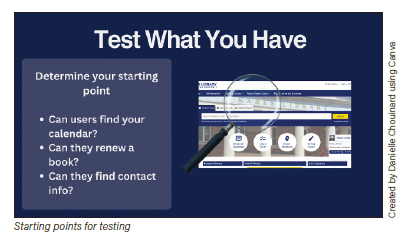 A simple and effective way to learn how patrons experience your website is to watch them complete a specific task. This is called usability task testing. You don’t need special software to begin—just a volunteer, a computer, and your own curiosity. Choose one important task, such as reserving a study room. Ask your volunteer to complete it while narrating their thought process: what they expect to find, where they look, and what confuses them. Comments (such as, “Maybe it’s under Services? No, Spaces …”) provide insight into how users interpret your site structure and labels. Keep your input minimal. Just watch, listen, and take notes using whatever method works for you. Afterward, review your notes for patterns. Did they hesitate at a certain menu? Expect information under a different label? These clues point to where navigation might be unclear. Focus less on what went wrong and more on why certain steps seemed confusing to your volunteer. A simple and effective way to learn how patrons experience your website is to watch them complete a specific task. This is called usability task testing. You don’t need special software to begin—just a volunteer, a computer, and your own curiosity. Choose one important task, such as reserving a study room. Ask your volunteer to complete it while narrating their thought process: what they expect to find, where they look, and what confuses them. Comments (such as, “Maybe it’s under Services? No, Spaces …”) provide insight into how users interpret your site structure and labels. Keep your input minimal. Just watch, listen, and take notes using whatever method works for you. Afterward, review your notes for patterns. Did they hesitate at a certain menu? Expect information under a different label? These clues point to where navigation might be unclear. Focus less on what went wrong and more on why certain steps seemed confusing to your volunteer.
Common Problems During Testing and How to Fix Them
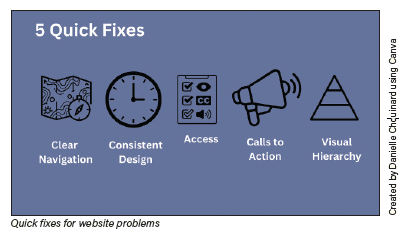
Once you start usability testing, patterns will emerge. Your volunteer may hesitate to find a link, overlook key information, or seem unsure about what to do next, indicating areas of confusion on your site. The good news is that many usability issues follow familiar patterns and often have straightforward solutions. The following are five common website problems and practical ways to fix them. Each area plays an important role in helping users accomplish their goals confidently and is designed to help you move from insights to action, so you can make your website more user-friendly.
 Clear Navigation Clear Navigation
When visitors come to your library’s website, they usually have a specific goal in mind. Your site’s navigation should help them reach that goal quickly and without confusion. Clear, intuitive navigation is one of the most powerful ways to improve UX.
Start by keeping your main menu simple. Aim for no more than five to seven top-level items. Too many choices can overwhelm users and make it harder for them to decide where to click. Use descriptive, plain-language labels that tell users exactly what they’ll find. For example, instead of a vague menu item such as Resources, use specific terms such as Ebooks or Databases. Likewise, avoid internal jargon and acronyms such as OPAC or ILS, and simply label your search box Search.
Next, create logical groupings within your menus. For example, in an academic setting, the Services menu could include options for Writing Center, Research Help, and Online Reference. Grouping similar content together helps users predict where to find what they need. Finally, use data to inform your navigation decisions. Through interviews or surveys, figure out what your users most often do first when they arrive at your site. Once you know their top goals, make sure those key tasks and links are easy to find from your homepage. Clear, predictable navigation reduces frustration and builds user confidence. When patrons can move through your site with ease, they’re far more likely to return.
 Consistent Design Consistent Design
Consistency helps users feel oriented and confident as they move through your site. When every page looks and behaves in a similar way, visitors can focus on finding information rather than relearning the layout. Consistent design also strengthens your library’s visual identity and builds trust.
Begin by ensuring that core design elements, such as your library logo, color palette, and typefaces, remain the same across all pages. A unified look reinforces your brand and helps users recognize that they are still within the library site. Keep your color palette simple, ideally with no more than three main colors, and make sure that color combinations are accessible and easy to read. If you work in a larger institution, consult your organization’s style guide or communications staff for guidance. If not, consider recruiting a creative volunteer or local design student to help refine your visual style. A cohesive design signals professionalism and reliability while making your site easier and more enjoyable to use.
 Accessibility Features Accessibility Features
Accessibility ensures that everyone, including people with disabilities, can use your website effectively. Start with these basic actions to identify and fix common accessibility issues:
- Add descriptive alt text to images. Every meaningful image should include text that explains its content or purpose.
- Ensure sufficient color contrast. Text should be easy to read against the background. Avoid color combinations that blend together or rely solely on color to convey meaning.
- Use clear, descriptive link text. Instead of “Click here,” use links that describe the destination, such as, “View our hours” or “Search the catalog.”
The suite of WAVE web accessibility evaluation tools ( wave.webaim.org ) is an excellent free resource that provides detailed suggestions for improving your website’s accessibility. Even small improvements can make a big difference in ensuring that everyone can access and enjoy your website content.
 Call to Action Call to Action
A call to action (CTA) is a short, clear prompt that invites users to do something specific on your website. Effective CTAs help guide visitors toward useful actions. On a library website, CTAs might include phrases such as, “Search for Articles, Books, and More,” “Ask a Librarian,” or “Renew Your Books.” To make CTAs more effective, place them where users naturally pause or make decisions, such as near a search box, at the end of a service description, or in the main navigation. Use clear, active language, and ensure buttons or links are easy to spot, with consistent formatting and adequate contrast. Thoughtfully designed CTAs give users confidence and help them quickly accomplish what they came to your site to do.
 Visual Hierarchy Visual Hierarchy
Visual hierarchy refers to the way a webpage’s design and layout guide the viewer’s eye toward what’s most important first. It’s how elements such as size, color, contrast, spacing, and placement work together to create a clear order of information. A strong visual hierarchy helps users understand where to start, what actions are available, and what content matters most.
Think of each webpage as a visual map. The items that users need most, such as page titles and the search bar, should stand out and appear near the top or center, where attention naturally falls. When everything looks equally prominent or feels cluttered, users must work harder to decide what to click or read first, which can quickly lead to frustration. Here are a few practical ways to strengthen visual hierarchy on your site:
- Put what’s most important at the top and make it larger. Key tasks and messages should appear before less-essential details.
- Keep the same logo or header on every page. Consistency in branding reassures users that they’re still on the library website.
- Include plenty of white space. Empty space around text and images prevents visual clutter and makes pages easier to scan.
When visual hierarchy is clear, your pages feel calm, organized, and intuitive. Users can move through the site with confidence because the design gently guides their attention to what matters most. A well-structured layout doesn’t just look better—it makes your website easier to use, which is key to good UX design.
Continuous Improvement: Keeping the UX Cycle Going
Improving UX isn’t a one-time project—it’s an ongoing cycle of learning, testing, and refining. After you make changes to your website, it’s important to return to your users and test those changes again. Does the new design make it easier for people to find what they need? Did you fix the confusion that you observed before? Each round of feedback gives you valuable insight into whether your updates are truly making the site better for patrons. Over time, small, user-informed adjustments will result in a smoother, more intuitive website experience that reflects your library’s ongoing commitment to service and accessibility.
Final Thoughts
By embracing a UX mindset, you gain far more than a prettier website—you gain a clearer understanding of your users and stronger connections with your community. UX methods help you make evidence-based improvements, build trust, strengthen collaboration, and advocate for change within your organization. Start small, stay curious, and let your users guide you. Each improvement you make brings your library’s online experience closer to what your patrons truly need, and that’s the heart of great UX.
|






 Danielle Chouinard (